Update Your Password

Securely restore access to your Libro account

How to update or reset your password in Libro’s Online Banking or the Mobile App.
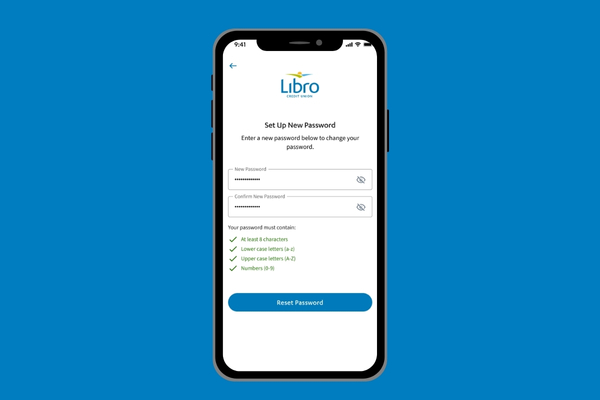
A phone showing a screenshot of the Update Your Password screen in Libro's Mobile Banking App

Forgotten Your Password?

Note: You must already have 2-Step Verification set up with a phone number and recovery email in order to reset your password. If you do not, you must contact Libro Connect or a Libro branch for assistance.

  1. Click “Forgot Password?” on the main login screen of Online Banking or the Libro Mobile App.
  2. Enter your Member Number into the field and click “Continue.”
  3. An email will be sent to the recovery email you have on file with instructions to reset your password. You must click the “Reset Password” link in the email, which will then redirect you to Libro Online Banking or the Libro App.
  4. You will then need to verify yourself through 2-Step Verification with your phone number, where you will receive a text message with a code. Enter the code you receive into the field box and click “Continue.”
  5. Once verified, enter your new password twice, following the password requirements. Click “Reset Password.”
  6. Success! Your new password has been created. You can now click to go “Back to Sign In.”

Update Your Password in Libro Online Banking

  1. Log in to Online Banking or the Libro Mobile App.
  2. On Mobile, click on the More menu in the bottom right corner. Click “Settings.” On Desktop, click on your profile picture in the top right corner. Click “Settings.”
  3. Navigate to the Security page, where you will see Password. Click “Change.”
  4. Enter your current password, then your new password twice. Click “Save.”

Frequently Asked Questions

First, it is important to understand that you use the same login credentials for Yooli as you would Libro’s online banking. That means when you reset your password for Yooli, you also reset your password for online banking.

To do this follow these easy steps:

Step 1: Call Libro Connect at 1-800-361-8222 and receive a temporary password.

Step 2: Login to online banking using your temporary password, it will prompt you to create a new password of your choosing.

Step 3: Use your new password to login to Yooli!

Libro Connect is open 8am to 8pm Monday to Friday and from 8am to 4pm on Saturday.

Reminder: We recommend creating a strong password using letters, numbers and special characters. Please remember to keep your password private.

Other Resources

A blue outline of an open laptop

Libro Online Banking

Learn More
A hand with palm facing up and two coins hovering above it

Ways to Bank

Learn More
Mobile Phone

Libro Mobile Banking

Learn More

Need help? Reach out to Libro Connect